EveryHuawei
No Result
View All Result
  • MateBook
  • Tech
    • Gadgets
  • Tech Specs
    • MateBook
  • AI
  • Review
  • News
  • Huawei
  • Gaming
  • MateBook
  • Tech
    • Gadgets
  • Tech Specs
    • MateBook
  • AI
  • Review
  • News
  • Huawei
  • Gaming
No Result
View All Result
EveryHuawei
No Result
View All Result
ADVERTISEMENT

How to Use NIGHT Mode on Huawei for Better Low-Light Photos

EveryHuawei by EveryHuawei
11 months ago
in News
How to Use NIGHT Mode on Huawei for Better Low-Light Photos
ADVERTISEMENT

If you love capturing moments after sunset, NIGHT mode on Huawei is your perfect companion. It helps you take sharp, colorful, and well-lit photos even in low-light environments. Whether you’re snapping cityscapes, neon lights, or moody skies, NIGHT mode turns ordinary night shots into stunning visuals.

ADVERTISEMENT

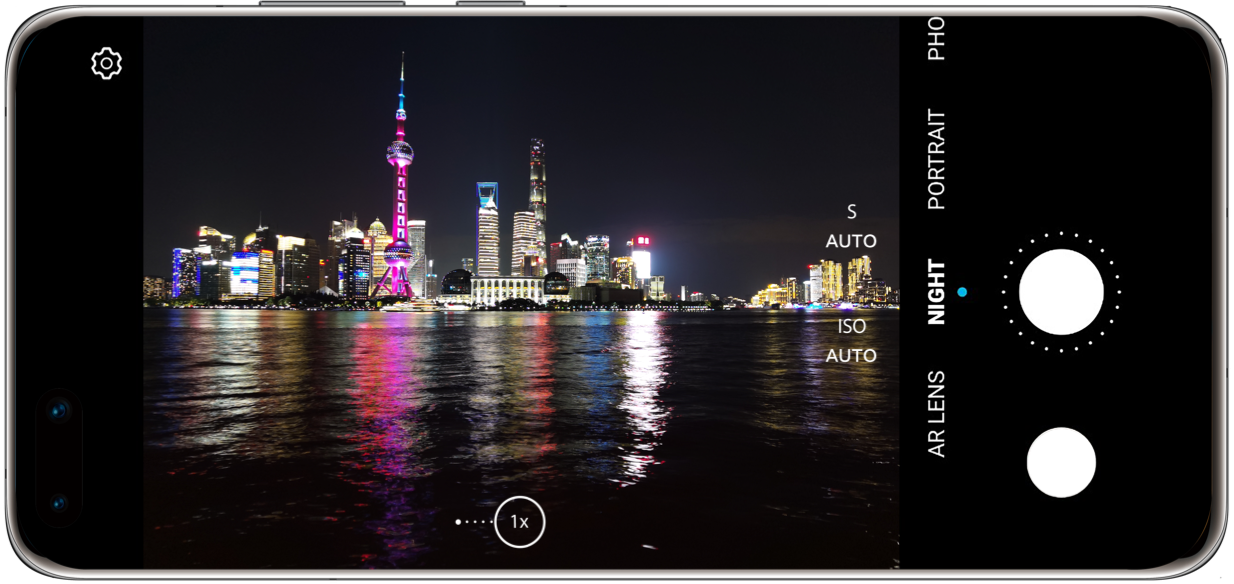
To begin, open the Camera app on your Huawei device. Swipe to select NIGHT mode, then tap the shutter icon. The camera will automatically calculate the best exposure time based on available light. During this process, hold your phone steady and wait for the countdown to finish. This helps you avoid motion blur and ensures a crisp photo.

Additionally, if you’re using EMUI 10.1 or later, you can access advanced settings. Tap the Settings icon to adjust the Aspect Ratio, enable the Assistive Grid, or turn on the Horizontal Level for better framing and alignment.

Here are four expert tips to help you get the most out of Huawei’s NIGHT mode:

Firstly, stability is key. Even a small shake can blur your photo. Use a tripod or place your phone on a stable surface. Alternatively, connect a wired earphone and use its function button as a remote shutter for hands-free control.

ADVERTISEMENT

Secondly, manage your exposure wisely. NIGHT mode increases ISO to brighten dark scenes, but high ISO may introduce noise. To find a balance, start with ISO 100 and a 2-second shutter speed. If the image is too noisy, reduce the shutter time. If it’s too dark, gradually increase the shutter speed until you find the ideal setting.

Thirdly, consider the best time to shoot. Photos taken during sunrise or sunset feature soft lighting and dramatic skies, making your shots more artistic. Moreover, this golden hour light adds emotional depth to your images.

Fourthly, embrace the weather. Rainy conditions create reflections and raindrop textures that add character. Focus on puddles to capture reflections of city lights, which often look like impressionist paintings.

In conclusion, Huawei’s NIGHT mode isn’t just for nighttime—it’s for anytime the light is low and creativity is high. With these steps and tips, you’ll capture photos that are both beautiful and atmospheric.

ADVERTISEMENT

READ: How to Share Files Using Huawei Share

Tags: how to use NIGHT mode on HuaweiHuawei camera night photographyHuawei EMUI night modeHuawei night mode tutoriallow light photography Huawei
ADVERTISEMENT
Previous Post

How to Share Files Using Huawei Share

Next Post

Spain Awards €12.3M Wiretap Contracts to Huawei Despite Espionage Fears

Related Posts

Huawei Launches Watch Fit 5 Series Globally
News

Huawei Launches Watch Fit 5 Series Globally

by EveryHuawei
May 7, 2026
0

Huawei has officially launched the Huawei Watch Fit 5 series globally during its “Now Is Your Spark” event in Bangkok,...

Read moreDetails
Huawei Pura 90 Multispectral Camera Surprise
Huawei

Huawei Pura 90 Multispectral Camera Surprise

by EveryHuawei
April 21, 2026
0

The Huawei Pura 90 multispectral camera is emerging as one of the most unexpected innovations in Huawei’s latest smartphone lineup,...

Read moreDetails
Huawei Pura 90 Pro Max Camera Breakthrough
News

Huawei Pura 90 Pro Max Camera Breakthrough

by EveryHuawei
April 21, 2026
0

The Huawei Pura 90 Pro Max camera is pushing smartphone photography into new territory, introducing industry-first stabilisation and imaging technologies...

Read moreDetails
Huawei Pura X2 Battery Upgrade Leaked
Huawei

Huawei Pura X2 Battery Upgrade Leaked

by EveryHuawei
March 17, 2026
0

The Huawei Pura X2 battery upgrade reportedly targets 6000mAh capacity, representing a substantial improvement over the previous generation. Specifically, this...

Read moreDetails
Huawei Mate 80 GTS Launch Set for March 23
Huawei

Huawei Mate 80 GTS Launch Set for March 23

by EveryHuawei
March 17, 2026
0

The Huawei Mate 80 GTS launch may occur March 23, according to industry tipsters following Huawei's official event announcement. Specifically,...

Read moreDetails
HarmonyOS Wins iF Design Award
News

HarmonyOS Wins iF Design Award

by EveryHuawei
March 10, 2026
0

HarmonyOS iF Design Award recognition highlights Huawei’s growing influence in software design and user experience innovation. The company’s self-developed operating...

Read moreDetails
Load More
Next Post
Spain Huawei wiretap contracts

Spain Awards €12.3M Wiretap Contracts to Huawei Despite Espionage Fears

Huawei in-car content partnerships

Huawei Teams Up with Anghami and Nabd to Supercharge In-Car Entertainment

ADVERTISEMENT
  • About
  • Terms of Use
  • Advertise
  • Contact
  • DMCA
  • Privacy

© 2026 Every Huawei

No Result
View All Result
  • About Us
  • Advertise With EveryHuawei
  • Contact Us
  • DMCA Policy
  • Privacy Policy
  • Terms of Use

© 2026 Every Huawei