

Huawei’s latest tablet, the MatePad 11.5 S, has arrived with impressive features designed to cater to digital artists, note-takers, and creative professionals. Known for its high-performance hardware, standout display, and premium build quality, this device is an enticing option for users looking for an advanced tablet. However, despite its many strengths, the MatePad 11.5 S does have some notable trade-offs, particularly regarding its battery life, which may not satisfy those seeking an all-day device.
From a sleek aluminum body to a cutting-edge matte display, Huawei is clearly aiming to compete with the likes of Apple’s iPad Air and Samsung’s Galaxy Tab series. However, despite its excellent display and strong performance in certain creative tasks, the tablet’s battery struggles with the high demands of its powerful screen, leaving users needing to recharge more often than expected.
Design and Build: Lightweight Yet Fragile
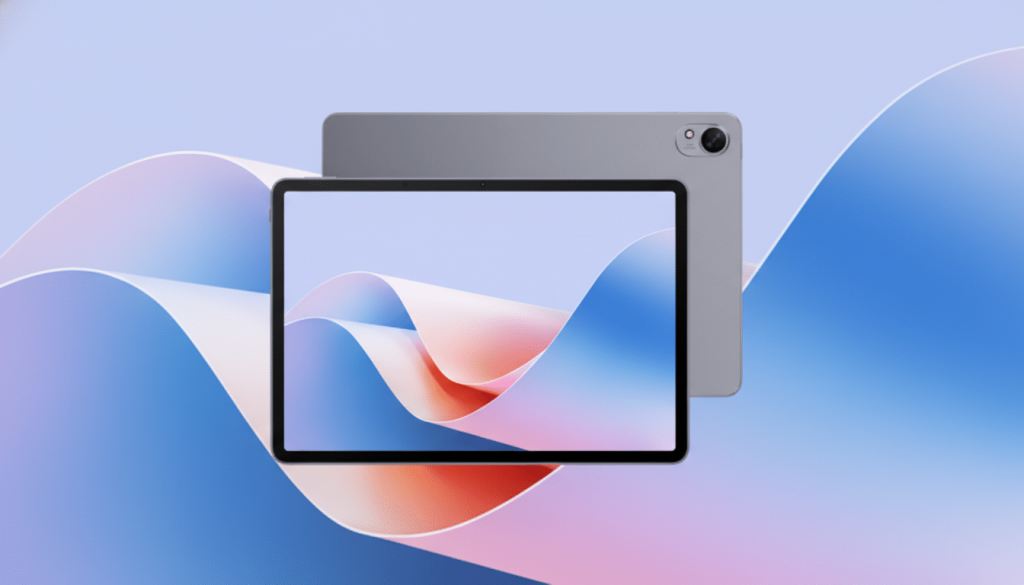
The MatePad 11.5 S sports a minimalist design with a clean aluminum chassis, making it both thin and light. At just 6.1mm thick and weighing approximately 515g, it’s comfortable to hold for extended periods, whether you’re reading, sketching, or taking notes. Despite its thin profile, the build feels sturdy, although it lacks any official water or dust resistance rating, which means it should be handled with care.
In terms of industrial design, Huawei’s tablet falls in line with its competitors, offering a simple yet premium aesthetic that focuses on functionality. However, when compared to similar-sized tablets like Apple’s 11-inch iPad Air and Samsung’s premium 11-inch tablets, the MatePad 11.5 S feels more subtle and doesn’t necessarily scream for attention. But, for users who prioritize a clean, sophisticated look, this device does a great job of balancing style and utility.
Display: The Star of the Show
One of the most impressive features of the MatePad 11.5 S is its display. Huawei has packed a 2.8K resolution IPS panel with a 144Hz refresh rate into the screen, creating a display that is visually engaging and responsive. The screen measures 2800 x 1840 pixels, offering vibrant colors and sharp details.
What truly sets this display apart is its matte finish, achieved through a nano-etched coating. This treatment dramatically reduces glare, ensuring that you can view the screen comfortably even in environments with strong overhead lighting. Whether you’re reading documents, sketching, or browsing the web, the matte texture adds a tactile feel that improves the overall user experience. In fact, when using a stylus, the drag from the matte surface mimics the sensation of drawing on paper—an effect that many digital artists will appreciate.
While the color accuracy and deep contrast of OLED displays may be missed, the MatePad 11.5 S performs exceptionally well in reducing reflections, making it perfect for use outdoors or in bright indoor settings. The high refresh rate also makes for smoother scrolling and fluid pen tracking, enhancing the overall feel of using the device for creative tasks. For anyone who values a glare-free writing and drawing surface, the MatePad 11.5 S stands out as a clear winner in its category.
Performance: Robust Hardware Meets Creative Demands
Under the hood, the MatePad 11.5 S is powered by Huawei’s Kirin 9000WE chipset, a powerful processor designed to handle demanding tasks. With eight CPU cores and 8GB of RAM, this tablet is more than capable of managing complex applications such as 4K canvas drawing apps, multitasking with reference materials, and working on projects that require high computing power. The 144Hz screen further complements the performance, making the device responsive during sketching or note-taking.
For content creators, illustrators, and digital artists, the MatePad 11.5 S performs admirably in its intended tasks. Whether it’s sketching intricate designs, working on multilayered graphics, or taking notes during meetings, the tablet manages to stay smooth and efficient.
In terms of audio, the MatePad 11.5 S features four speakers, which deliver surprisingly deep bass for a tablet of its size. The speakers can get loud enough for watching movies or listening to podcasts. However, while they produce a rich sound overall, the mids and highs are somewhat recessed, which can soften voices and reduce the clarity of higher frequencies. Casual listeners will enjoy the sound, but creators or audiophiles may want to rely on headphones for a more accurate sound profile.
Battery Life: A Compromise for Premium Features
The biggest trade-off with the MatePad 11.5 S lies in its battery life. With an 8,700mAh battery and 40W fast charging, the device can charge quickly, but the high-performance 2.8K display at 144Hz proves to be a battery hog. In our stress testing, continuous web browsing or video streaming resulted in about five hours of usage, far below the 10-hour benchmarks set by competitors like the iPad Air or Samsung Galaxy Tab series.
Under lighter loads, such as note-taking or low-refresh-rate use, the battery does last longer, but heavy activities like streaming high-definition content or extensive sketching with a bright screen will quickly deplete the battery. This means that users will likely need to recharge the device throughout the day, especially for more demanding tasks. While 40W fast charging helps top off the battery in a pinch, frequent charging or a portable power bank is almost a must for anyone planning to use the device on the go.
Accessories: Enhancing Functionality for Professionals
Huawei has created a range of accessories designed to enhance the functionality of the MatePad 11.5 S. The M-Pencil Pro, a stylus designed for the tablet, offers 16,384 pressure levels and includes tilt and rotation support, making it ideal for artists and note-takers who need precision. The pen works smoothly with the matte screen, providing a satisfying writing or drawing experience. However, the M-Pencil Pro comes at an additional cost, pushing the total price of the tablet into the range of premium laptops if you purchase the full set of accessories.
In addition to the stylus, Huawei offers a magnetic keyboard case that attaches seamlessly to the tablet. The keyboard works wirelessly via Bluetooth and features a clever design that allows it to be detached from the backplate when not needed. While there is no trackpad, making it less suitable for full laptop replacement, the keyboard’s typing experience is surprisingly comfortable and responsive. It’s a standout feature for those looking to use the tablet for productivity tasks like word processing or email.
Software: HarmonyOS Without Google Services
One area where the MatePad 11.5 S falls short compared to other premium tablets is in its software ecosystem. The tablet runs Huawei’s HarmonyOS, which does not include Google Mobile Services (GMS). This means popular apps like Google Drive, Google Docs, and Microsoft Office aren’t available by default, and workarounds can sometimes be clunky or unreliable.
However, for users who don’t rely on Google’s suite of tools, Huawei’s Notes app and GoPaint drawing suite are solid alternatives that leverage the tablet’s hardware and provide a smooth experience for productivity and creativity. Still, the lack of GMS presents a significant barrier for those who depend on Google’s ecosystem for their daily tasks.
A Strong Choice for Creatives, But Not Perfect
In conclusion, the Huawei MatePad 11.5 S is an impressive device for creative professionals and students who value a matte, glare-free display, fluid pen tracking, and a high-performing tablet that offers an excellent drawing and note-taking experience. However, the trade-off in battery life and the absence of Google Services are significant drawbacks for those seeking all-day use or reliance on a Google-centric workflow.
For users who prioritize premium visuals, responsive pen input, and a versatile, well-priced tablet for creative tasks, the MatePad 11.5 S is a strong contender. However, if long-lasting battery life or seamless access to popular apps is a priority, users may want to explore alternatives.